 Skip to content

What is IPTV M3U VLC?
Definition of IPTV M3U Playlists
IPTV M3U for VLC refers to the use of M3U playlists within the VLC media player to access a variety of television channels and on-demand content. An M3U playlist is a simple text file that contains a list of streaming URLs, allowing users to watch live TV, movies, and series directly through VLC. This format is widely recognized for its flexibility and effectiveness in organizing streaming links, making it a popular choice among IPTV users.

With an iptv vlc m3u, users can enjoy a diverse range of channels, including sports, entertainment, and international programming. The integration of M3U playlists into VLC enhances the viewing experience by providing a centralized platform for accessing multiple streams.
Benefits of Using IPTV M3U with VLC Media Player
Utilizing IPTV M3U playlists with VLC offers several significant advantages:
- Cost-Effective: Many IPTV M3U playlists are available for free or at a low cost, allowing users to access a wide range of channels without the expense of traditional cable subscriptions.
- Wide Variety of Content: Users can find channels across various genres, including sports, movies, and news, providing a comprehensive viewing experience.
- User-Friendly Interface: VLC is known for its intuitive interface, making it easy for users to navigate through their playlists and find the content they want to watch.
- Customization Options: Users can create and edit their own M3U playlists, tailoring their viewing experience to their preferences. This includes adding or removing channels as desired.
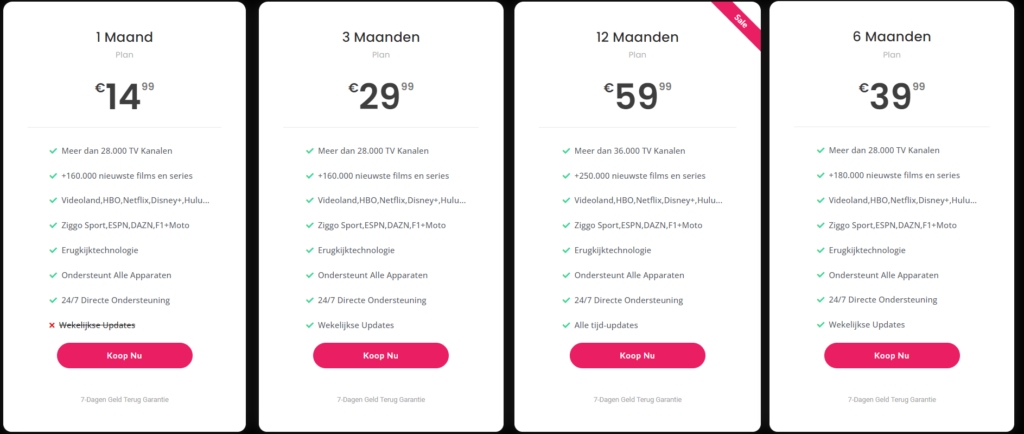
For more information on how to effectively use IPTV services, check out our IPTV plans. Pro IPTV Smarters offers a variety of subscription options that provide access to over 36,000 channels and 250,000 movies and series, starting at just €5 per month. For detailed installation instructions, visit our installation guide.
In summary, understanding what IPTV M3U for VLC is and the benefits of using these playlists can significantly enhance your viewing experience. With the right M3U links, you can enjoy a vast array of content tailored to your preferences. Stay tuned for more information on how to install and manage your IPTV M3U playlists effectively.
How to Play IPTV M3U Playlists in VLC
Step-by-Step Guide to Opening M3U Playlists
Playing IPTV M3U playlists in VLC is a simple process that allows you to access a wide range of channels directly from your media player. Here’s a step-by-step guide to help you set up and use IPTV M3U playlists in VLC:
- Download and Install VLC: If you haven’t already, download VLC Media Player from the official VLC website. It is available for various platforms, including Windows, macOS, and Linux.
- Obtain Your M3U Playlist URL: Find a reliable iptv vlc m3u link. You can search for free IPTV M3U playlists on forums, websites, or social media platforms. Ensure that the link is up-to-date and has positive feedback from users.
- Open VLC Media Player: Launch VLC on your device.
- Access the Network Stream Option:
- Click on “Media” in the top menu.
- Select “Open Network Stream” from the dropdown menu.
- Enter the M3U URL: In the “Network” tab, paste the kodi iptv m3u url you obtained earlier into the provided field. Click on “Play” to start streaming.
- Enjoy Your Channels: Once the M3U link is loaded, you should see the channels available in the playlist. You can navigate through them and start watching your favorite content.
Streaming IPTV Channels via VLC: Best Practices
To ensure a smooth streaming experience with IPTV M3U on VLC, consider the following best practices:
- Stable Internet Connection: A reliable and fast internet connection is crucial for uninterrupted streaming. Ensure that your connection can handle the bandwidth required for streaming high-quality content.
- Regularly Update Your M3U Links: Free IPTV links can become outdated quickly. Regularly check for updated iptv m3u list links on platforms like Reddit or Telegram to ensure you have access to the latest channels.
- Use a VPN for Privacy: If you are concerned about privacy or accessing geo-restricted content, consider using a VPN while streaming. This can help protect your identity and provide access to a wider range of channels.
- Troubleshooting Playback Issues: If you encounter issues such as buffering or channels not loading, check the following:
- Ensure the M3U link is correctly entered.
- Verify your internet connection.
- Try using a different M3U link if the current one is not working.
By following these steps and tips, you can effectively use IPTV M3U playlists in VLC to enjoy a wide variety of content. For more information on IPTV services and how to get started, check out our IPTV plans for affordable subscription services that offer extensive channel lists and on-demand content. Pro IPTV Smarters provides access to over 36,000 channels and 250,000 movies and series, with plans starting at just €5 per month. For detailed installation instructions, visit our installation guide.
In conclusion, playing IPTV M3U playlists in VLC can greatly enhance your viewing experience. With the right setup and a bit of patience, you can enjoy a vast array of channels tailored to your preferences. Stay tuned for more insights on managing and optimizing your IPTV playlists effectively.
Troubleshooting Common Issues with IPTV M3U on VLC
Common Playback Problems and Their Solutions
When using IPTV M3U on VLC, you may encounter various playback issues that can disrupt your viewing experience. Here are some common problems and effective solutions to help you troubleshoot:
- Channel Not Loading: If a channel does not load, it may be due to an outdated or broken M3U link. Here’s what you can do:
- Check the M3U URL: Ensure that the iptv vlc m3u link is correctly entered. A small typo can prevent the channel from loading.
- Find Updated Links: Regularly search for new iptv m3u list links on platforms like Reddit or Telegram, where users frequently share updated playlists.
- Buffering Issues: If you experience buffering while streaming, it could be due to a slow internet connection. To resolve this:
- Test Your Internet Speed: Use an online speed test to check your connection. A minimum speed of 10 Mbps is recommended for smooth streaming.
- Reduce Network Load: Ensure that other devices on your network are not consuming excessive bandwidth. Disconnecting unnecessary devices can help improve streaming quality.
- Playback Quality: If the video quality is poor, consider the following:
- Adjust VLC Settings: Go to “Tools” > “Preferences” > “Input/Codecs” and adjust the caching value. Increasing the cache size can help improve playback quality.
- Use a Different M3U Link: Sometimes, the quality of the stream depends on the source. Try using a different iptv m3u url to see if the quality improves.
- VLC Crashing or Freezing: If VLC crashes or freezes while trying to play an IPTV stream:
- Update VLC: Ensure you are using the latest version of VLC Media Player. Updates often include bug fixes and performance improvements.
- Reinstall VLC: If problems persist, consider uninstalling and reinstalling VLC to reset any corrupted settings.
Tips for Optimizing Playback Performance
To enhance your overall experience when using IPTV M3U on VLC, consider these optimization tips:
- Use a Wired Connection: If possible, connect your device directly to your router using an Ethernet cable. This can provide a more stable connection compared to Wi-Fi.
- Close Unnecessary Applications: Running multiple applications can slow down your device. Close any unnecessary programs to free up system resources for VLC.
- Regularly Update Your M3U Playlists: Free IPTV links can change frequently. Regularly check for updated playlists to ensure you have access to the latest channels. You can find updated links on forums or through community groups.
- Utilize a VPN: If you are accessing geo-restricted content, using a VPN can help you bypass these restrictions while also providing an additional layer of privacy.
Frequently Asked Questions about IPTV M3U and VLC
Here are some common questions regarding IPTV M3U and VLC:
- How to Load M3U Files into VLC?: To load M3U files, open VLC, go to “Media” > “Open Network Stream,” and paste the M3U URL into the field provided.
- What are the Best IPTV M3U Links for VLC?: The best links are often shared on community forums like Reddit. Look for links that have been recently updated and have positive user feedback.
For more information on IPTV services and how to get started, check out our IPTV plans for affordable subscription services that offer extensive channel lists and on-demand content. Pro IPTV Smarters provides access to over 36,000 channels and 250,000 movies and series, with plans starting at just €5 per month. For detailed installation instructions, visit our installation guide.
In conclusion, troubleshooting common issues with IPTV M3U on VLC can greatly enhance your viewing experience. By following these tips and solutions, you can enjoy a seamless streaming experience tailored to your preferences. Stay tuned for more insights on managing and optimizing your IPTV playlists effectively.
Frequently Asked Questions about IPTV M3U and VLC
How to Load M3U Files into VLC?
Loading IPTV M3U files into VLC is a straightforward process that allows you to access a variety of channels directly from your media player. Here’s how to do it effectively:
- Open VLC Media Player: Start by launching VLC on your device. If you don’t have it installed, you can download it from the official VLC website.
- Access the Network Stream Option:
- Click on “Media” in the top menu.
- Select “Open Network Stream” from the dropdown menu.
- Enter the M3U URL: In the “Network” tab, paste the iptv vlc m3u link you obtained from a reliable source. This could be a free IPTV M3U link or one from a subscription service.
- Start Streaming: Click “Play” to start streaming. Once the M3U link is loaded, you should see the channels available in the playlist.
What are the Best IPTV M3U Links for VLC?
Finding the best IPTV M3U links for VLC can enhance your viewing experience significantly. Here are some tips on where to find reliable links:
- Reddit Communities: Subreddits like r/IPTV and r/iptvlinks are excellent resources for finding updated M3U playlists. Users frequently share their favorite links, which can include everything from sports to movies.
- Telegram Groups: Many IPTV enthusiasts use Telegram to share M3U playlists. Joining these groups can provide you with access to the latest iptv m3u url for various channels.
- IPTV Blogs and Websites: Numerous blogs focus on IPTV services and often compile lists of the best free M3U playlists. Websites like Pro IPTV Smarters provide valuable resources, including their own curated lists of channels.
Troubleshooting Common Issues with IPTV M3U on VLC
If you encounter issues while using IPTV M3U on VLC, here are some common problems and their solutions:
- Channel Not Loading: If a channel does not load, it may be due to an outdated link. Check for the latest iptv m3u list on platforms like Reddit or Telegram.
- Buffering Issues: Buffering can occur due to a slow internet connection. Ensure that you have a reliable and fast connection for optimal streaming.
- Playback Quality: If the video quality is poor, consider adjusting VLC settings. Go to “Tools” > “Preferences” > “Input/Codecs” and increase the caching value.
- VLC Crashing or Freezing: If VLC crashes or freezes while trying to play an IPTV stream, ensure you are using the latest version of VLC Media Player. Updates often include bug fixes and performance improvements.
For more information on IPTV services and how to get started, check out our IPTV plans for affordable subscription services that offer extensive channel lists and on-demand content. Pro IPTV Smarters provides access to over 36,000 channels and 250,000 movies and series, with plans starting at just €5 per month. For detailed installation instructions, visit our installation guide.
In conclusion, understanding how to load IPTV M3U files into VLC and troubleshooting common issues can greatly enhance your viewing experience. By following these tips and solutions, you can enjoy a seamless streaming experience tailored to your preferences. Stay tuned for more insights on managing and optimizing your IPTV playlists effectively.
Veelgestelde Vragen over IPTV M3U en VLC
In deze sectie beantwoorden we enkele veelgestelde vragen over het gebruik van IPTV M3U met VLC. Dit helpt je om een beter begrip te krijgen van hoe je IPTV M3U-playlists kunt gebruiken en optimaliseren voor een verbeterde kijkervaring.
Hoe Configureer Ik IPTV M3U Playlists in VLC?
Het configureren van IPTV M3U playlists in VLC is een eenvoudig proces. Volg deze stappen om je M3U-bestand toe te voegen en te configureren:
- Open VLC: Start de VLC-applicatie op je apparaat. Zorg ervoor dat je de nieuwste versie hebt geïnstalleerd voor de beste prestaties.
- Obtain Your M3U Playlist URL: Zoek een betrouwbare iptv vlc m3u link. Je kunt gratis IPTV M3U-playlists vinden op forums, websites of sociale mediaplatforms. Zorg ervoor dat de link actueel is en positieve feedback van gebruikers heeft.
- Open VLC Media Player: Start VLC op je apparaat.
- Toegang tot de Netwerkstreamoptie:
- Klik op “Media” in het bovenste menu.
- Selecteer “Open Network Stream” uit het dropdownmenu.
- Voer de M3U URL in: In het tabblad “Netwerk” plak je de iptv m3u vlc link die je eerder hebt verkregen. Klik op “Play” om te beginnen met streamen.
- Begin met Kijken: Zodra de M3U-link is geladen, zou je de kanalen in de playlist moeten zien. Je kunt door de kanalen navigeren en beginnen met kijken.
Wat zijn de Beste Add-ons voor IPTV op VLC?
Er zijn verschillende add-ons die je kunt gebruiken om je IPTV-ervaring op VLC te verbeteren. Hier zijn enkele aanbevolen add-ons:
- PVR IPTV Simple Client: Dit is de meest populaire add-on voor het laden van M3U-playlists. Het biedt een eenvoudige interface en is gemakkelijk te configureren.
- Kodi IPTV Add-ons: Er zijn verschillende andere add-ons beschikbaar die extra functionaliteit bieden, zoals het integreren van live TV-gidsen en het verbeteren van de gebruikersinterface.
Hoe Test Ik IPTV M3U Playlists op VLC?
Het testen van je IPTV M3U playlists op VLC is essentieel om ervoor te zorgen dat alles goed functioneert. Hier zijn enkele stappen om te volgen:
- Laad de Playlist: Zorg ervoor dat je de M3U-playlist correct hebt geladen in VLC. Controleer of de URL correct is ingevoerd.
- Controleer de Kanalen: Navigeer door de kanalen in VLC en controleer of ze correct laden. Als een kanaal niet laadt, kan het zijn dat de link verouderd is.
- Test de Streaming Kwaliteit: Kijk naar verschillende kanalen om te zien of de streaming soepel verloopt. Als je buffering of andere problemen ondervindt, kan dit wijzen op een probleem met de internetverbinding of de M3U-link.
- Gebruik een VPN: Overweeg het gebruik van een VPN om je privacy te beschermen en toegang te krijgen tot geo-restricted content. Dit kan ook helpen bij het verbeteren van de streamingkwaliteit.
Conclusie: De Voordelen van IPTV M3U VLC
In conclusie, het gebruik van IPTV M3U VLC biedt een uitstekende manier om toegang te krijgen tot een breed scala aan televisiekanalen en content. Door te kiezen voor M3U-lijsten, profiteer je van talrijke voordelen, zoals:
- Eenvoudige Toegang tot Diverse Inhoud: Geniet van live sportevenementen, films en series, allemaal via een gebruiksvriendelijke interface.
- Kostenbesparend: M3U-lijsten zijn vaak gratis of voordeliger dan traditionele kabelabonnementen, waardoor je geld kunt besparen.
- Eenvoudige Installatie: De meeste IPTV-diensten bieden duidelijke installatie-instructies, zodat je snel aan de slag kunt.
- 24/7 Ondersteuning: Met betrouwbare klantenservice kun je altijd rekenen op hulp bij eventuele vragen of problemen.
Bij Pro IPTV Smarters krijg je niet alleen toegang tot meer dan 36.000 kanalen en 250.000 films en series, maar ook uitgebreide installatiegidsen om je te helpen bij het opzetten van je M3U-lijsten. Dit zorgt ervoor dat je snel kunt genieten van je favoriete content.
Als je klaar bent om je IPTV M3U VLC te gebruiken of als je vragen hebt, aarzel dan niet om contact met ons op te nemen via WhatsApp. We staan klaar om je te helpen en ervoor te zorgen dat je de beste kijkervaring hebt!
